v2.0 · Windows 10 / 11 2026

Your PC Learns When
to Sleep and When to Roar

PowerDoze automatically adjusts power settings based on time, location, and what you're doing — so your laptop lasts longer, stays quiet, and never sleeps during a meeting.

Free forever · No subscription · 100% local
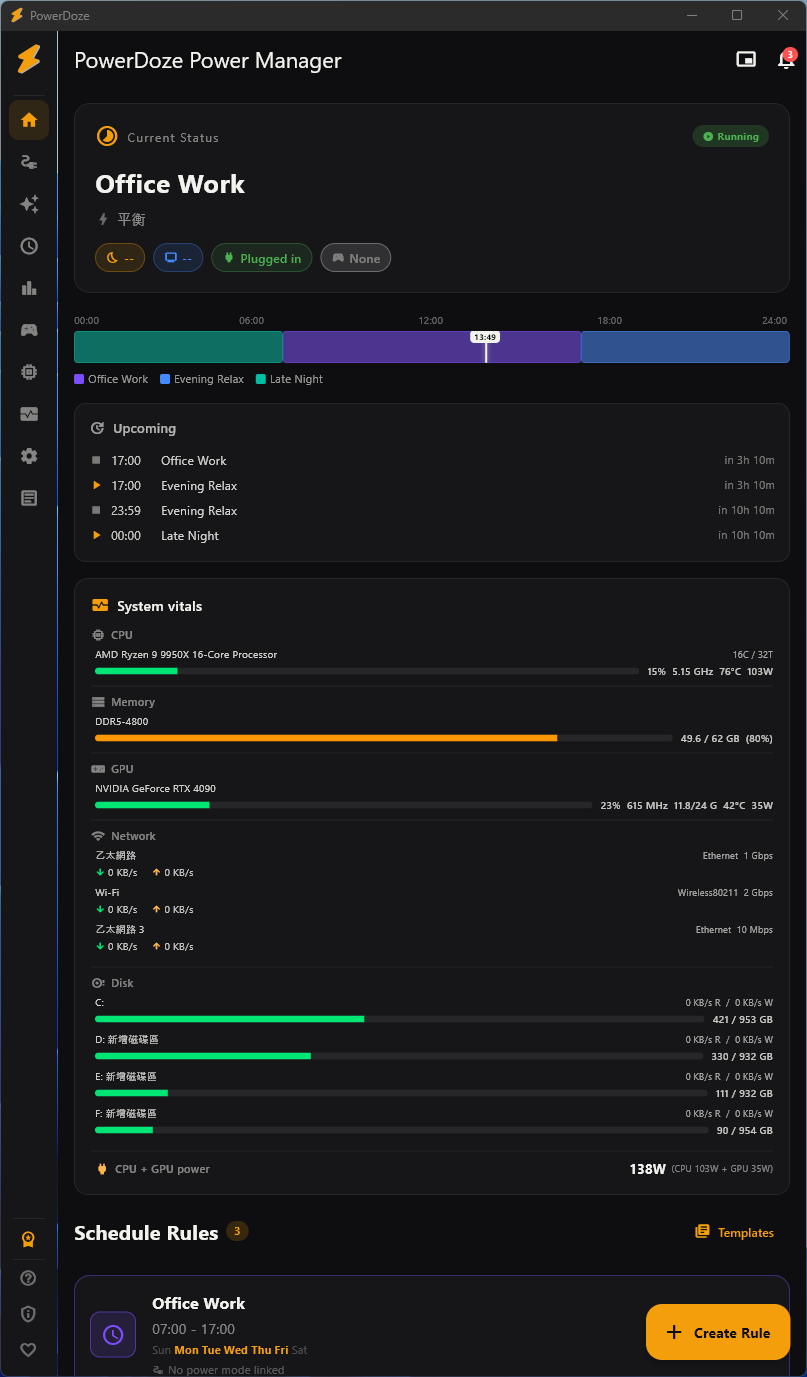
PowerDoze main screen
07 Languages
20+ Power features
0kB Cloud data sent
100% Local & private
How it works

Three steps to smarter power.

Set it up once. PowerDoze handles the rest in the background.

01 / Setup

Set your rules

Define when your PC should sleep, which apps prevent sleep, and what power mode to use for each time slot.

02 / Watch

PowerDoze monitors

It watches the time, running apps, fullscreen state, Wi-Fi network, and your activity level — silently.

03 / Adjust

Auto-adjusts

Power settings change automatically. No manual switching. Always the right mode for what you're doing.

Features

Everything you need to save power.

20+ features from scheduling to analytics. Core ones free forever.

F.01

Sleep rules Free

Schedule when your PC sleeps — different timeouts for work hours, evenings, and weekends.

F.02

Power modes Free

One-click profiles bundling CPU, screen, thermal, and GPU settings together.

F.03

Fullscreen detection Free

Games, movies, and presentations automatically pause sleep timers. Zero setup.

F.04

App foreground switch Pro

Map apps to power modes. Premiere Pro → High Performance. Switch back on focus change.

F.05

Wi-Fi geofencing Pro

Different power profile per Wi-Fi network. Office, home, café — auto-switched.

F.06

Battery smart policy Pro

Auto-switch modes based on battery level and charger state. Low battery? Eco mode.

See all 20+ features →
Pricing

Buy once, use forever.

No subscription. No hidden fees. Early customers get launch pricing.

Free
NT$0
forever
  • Core
  • Up to 3 sleep rules
  • 2 power modes
  • App whitelist
  • Fullscreen detection
  • Other
  • Hardware monitor
  • Settings export / import
Download free
14-day refund No questions asked
V2.x free updates Continuous improvements
Up to 3 devices Desktop, laptop, backup
One-time purchase Never a subscription
See detailed feature comparison →

Choose Payment Method

One-time purchase. 14-day money-back guarantee.

Secure payment. Your Pro license activates instantly after payment.

Savings calculator

How much will you save?

Estimate based on PowerDoze users' typical 30% energy reduction. Adjust the inputs to match your setup.

Reference
0–24 hours
Energy saved kWh / year
Cost saved / year
CO₂ reduced kg / year

PowerDoze Pro pays for itself in .

Estimate based on a typical 30% reduction during idle periods (auto-sleep, screen timeout, CPU mode switching). Heavy 24/7 workloads save less by %; mostly-idle PCs save more.

Beyond electricity: Pro also automates power-mode switching, multi-monitor refresh rate, and per-app GPU preference — saving you manual hassle and reducing hardware stress from constant max load.

Download

Get PowerDoze.

Compatible with Windows 10 (1903+) and Windows 11.

Download v2.0.2 for Windows
~50 MB · Includes installer · SHA256 verified
FAQ

Frequently asked questions

Is PowerDoze free?
Yes! Core features are free forever. Pro unlocks advanced automation like app-based switching, Wi-Fi geofencing, and analytics. It's a one-time purchase, not a subscription.
Does it send my data anywhere?
No. PowerDoze runs entirely on your local machine. The only network request is an optional update check and Pro license verification. No telemetry.
Why does Windows SmartScreen show a warning?
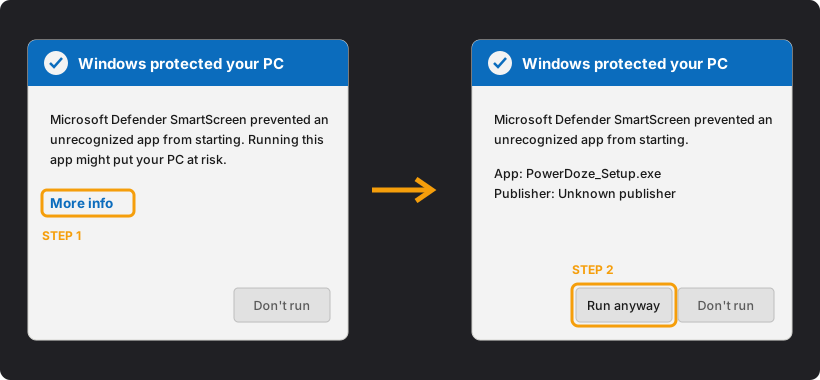
Code signing certificates cost US$200+/year. As an indie developer, we'll add signing once the project is sustainable. Click "More info" then "Run anyway" to proceed safely.
Can I transfer my license to a new PC?
Yes. Each Pro license works on up to 3 devices. Manage your bound devices from the account page — unbind an old PC to free a slot.
Does it work on laptops and desktops?
Both. Laptops benefit from battery policies and away mode. Desktops benefit from scheduled sleep rules and app-based power mode switching.
What happens if I don't like it?
The free version has no time limit. If you bought Pro, you have a 14-day money-back guarantee, no questions asked.